组网需求:
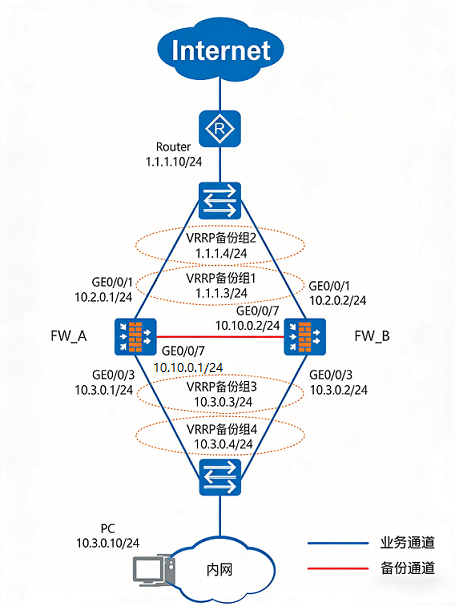
两台FW的业务接口都工作在三层,上下行分别连接二层交换机。上行交换机连接运营商的接入点,运营商为企业分配的IP地址为1.1.1.3和1.1.1.4。
现在希望两台FW以负载分担方式工作。正常情况下,FW_A和FW_B共同转发流量。当其中一台FW出现故障时,另外一台FW转发全部业务,保证业务不中断。
组网图:
配置思路:
理解熟悉配置思路即可,不需要背命令
1. 网络拓扑说明
- 两台防火墙(FW_A、FW_B)业务接口均工作在三层。
上下行均通过二层交换机连接:
- 上行交换机 → 运营商接入点(分配 IP:1.1.1.3、1.1.1.4)
- 下行交换机 → 内网 PC
目标:
- 正常情况下两台 FW 共同转发流量(负载分担)。
- 单台故障时另一台接管全部业务,保证不中断。
2. 基础配置
2.1 接口 IP 地址
| 设备 | 接口 | IP 地址 |
|---|---|---|
| FW_A | GE0/0/1 | 10.2.0.1/24 |
| FW_A | GE0/0/3 | 10.3.0.1/24 |
| FW_A | GE0/0/7 | 10.10.0.1/24 |
| FW_B | GE0/0/1 | 10.2.0.2/24 |
| FW_B | GE0/0/3 | 10.3.0.2/24 |
| FW_B | GE0/0/7 | 10.10.0.2/24 |
2.2 接口安全区域
- GE0/0/1 → Untrust
- GE0/0/3 → Trust
- GE0/0/7 → DMZ
2.3 缺省路由
ip route-static 0.0.0.0 0.0.0.0 1.1.1.10
3. VRRP 配置(负载分担)
3.1 上行业务接口 GE0/0/1
FW_A:
- VRID 1 → Active (1.1.1.3)
- VRID 2 → Standby (1.1.1.4)
FW_B:
- VRID 1 → Standby (1.1.1.3)
- VRID 2 → Active (1.1.1.4)
3.2 下行业务接口 GE0/0/3
FW_A:
- VRID 3 → Active (10.3.0.3)
- VRID 4 → Standby (10.3.0.4)
FW_B:
- VRID 3 → Standby (10.3.0.3)
- VRID 4 → Active (10.3.0.4)
4. 双机热备配置
4.1 会话快速备份
hrp mirror session enable
4.2 心跳口与 HRP 启用
FW_A:
hrp interface GE0/0/7 remote 10.10.0.2
hrp enable
FW_B:
hrp interface GE0/0/7 remote 10.10.0.1
hrp enable
4.3 NAT 端口资源分组
- FW_A:
hrp nat resource primary-group - FW_B 自动同步为:
hrp nat resource secondary-group
5. 安全策略配置
- 在 FW_A 配置(自动同步至 FW_B):
security-policy
 rule name trust_to_untrust
  source-zone trust
  destination-zone untrust
  source-address 10.3.0.0 24
  action permit
6. NAT 策略配置
- 在 FW_A 配置(自动同步至 FW_B):
nat address-group group1
  route enable
  section 0 1.1.2.5 1.1.2.8

nat-policy
 rule name policy_nat1
  source-zone trust
  destination-zone untrust
  source-address 10.3.0.0 24
  action source-nat address-group group1
7. 交换机与 PC 配置
- 两台交换机相关接口加入同一 VLAN。
内网 PC:
- 一部分网关 → 10.3.0.3 (VRRP 组 3)
- 另一部分网关 → 10.3.0.4 (VRRP 组 4)
- 实现内网流量负载分担。
8. Router 配置
配置到 NAT 地址池的等价路由:
- 下一跳分别指向 VRRP 组 1 (1.1.1.3) 和 VRRP 组 2 (1.1.1.4)。
9. 验证步骤
9.1 VRRP 状态
display vrrp
- 确认 Master/Backup 状态正确。
9.2 HRP 状态
display hrp state verbose
- 双机热备建立成功,角色均为 Active。
9.3 会话检查
display firewall session table
- FW_B 出现 Remote 标记会话 → 表示会话同步成功。
9.4 故障切换测试
- PC 持续 ping Router (1.1.1.10)。
- 拔掉 FW_A GE0/0/1 网线 → 观察切换与丢包情况。
- 恢复网线 → 再次观察切换与丢包情况。
防火墙批量配置脚本
FW_A 配置脚本
#
 hrp enable
 hrp interface GigabitEthernet 0/0/7 remote 10.10.0.2
 hrp mirror session enable
 hrp nat resource primary-group
#
interface GigabitEthernet 0/0/1
 ip address 10.2.0.1 255.255.255.0
 vrrp vrid 1 virtual-ip 1.1.1.3 255.255.255.0 active
 vrrp vrid 2 virtual-ip 1.1.1.4 255.255.255.0 standby
#
interface GigabitEthernet 0/0/3
 ip address 10.3.0.1 255.255.255.0
 vrrp vrid 3 virtual-ip 10.3.0.3 active
 vrrp vrid 4 virtual-ip 10.3.0.4 standby
#
interface GigabitEthernet 0/0/7
 ip address 10.10.0.1 255.255.255.0
#
firewall zone trust
 set priority 85
 add interface GigabitEthernet 0/0/3
#
firewall zone dmz
 set priority 50
 add interface GigabitEthernet0/0/7
#
firewall zone untrust
 set priority 5
 add interface GigabitEthernet 0/0/1
#
 ip route-static 0.0.0.0 0.0.0.0 1.1.1.10
#
 nat address-group group1
  route enable
  section 0 1.1.2.5 1.1.2.8
#
security-policy
 rule name trust_to_untrust
  source-zone trust
  destination-zone untrust
  source-address 10.3.0.0 24
  action permit
#
nat-policy
 rule name policy_nat1
  source-zone trust
  destination-zone untrust
  source-address 10.3.0.0 24
  action source-nat address-group group1
FW_B 配置脚本
说明:FW_B 的安全策略与 NAT 策略由 FW_A 自动同步,无需手动配置。
#
 hrp enable
 hrp interface GigabitEthernet 0/0/7 remote 10.10.0.1
 hrp mirror session enable
 hrp nat resource secondary-group
#
interface GigabitEthernet 0/0/1
 ip address 10.2.0.2 255.255.255.0
 vrrp vrid 1 virtual-ip 1.1.1.3 255.255.255.0 standby
 vrrp vrid 2 virtual-ip 1.1.1.4 255.255.255.0 active
#
interface GigabitEthernet 0/0/3
 ip address 10.3.0.2 255.255.255.0
 vrrp vrid 3 virtual-ip 10.3.0.3 standby
 vrrp vrid 4 virtual-ip 10.3.0.4 active
#
interface GigabitEthernet 0/0/7
 ip address 10.10.0.2 255.255.255.0
#
firewall zone trust
 set priority 85
 add interface GigabitEthernet 0/0/3
#
firewall zone dmz
 set priority 50
 add interface GigabitEthernet0/0/7
#
firewall zone untrust
 set priority 5
 add interface GigabitEthernet 0/0/1
#
 ip route-static 0.0.0.0 0.0.0.0 1.1.1.10
- FW_A:完整配置(含安全策略与 NAT 策略)。
- FW_B:精简配置(策略与 NAT 自动同步,不重复配置)。
知识扫盲:何为HRP?
HRP(Hot Standby Redundancy Protocol)是华为防火墙的专属双机热备协议机制,它用于实现两台防火墙之间的状态同步、会话镜像、配置自动同步等功能,确保在主设备故障时备设备能无缝接管业务。
HRP 的关键特性(仅适用于华为防火墙)
| 功能模块 | 说明 |
|---|---|
| 会话同步 | hrp mirror session enable → 实时同步连接状态,避免会话丢失 |
| 配置同步 | auto-sync configuration → 主设备配置自动下发到备设备 |
| NAT端口资源分组 | hrp nat resource primary-group / secondary-group → 避免端口冲突 |
| 心跳链路 | hrp interface ... remote ... → 检测对端状态,触发切换 |
| 状态角色 | display hrp state verbose → 显示主/备状态与优先级 |
与标准 VRRP 的区别
| 协议 | 用途范围 | 功能覆盖 | 是否支持会话同步 | 是否自动同步配置 |
|---|---|---|---|---|
| VRRP | 通用三层设备 | 虚拟网关冗余 | ❌ 不支持 | ❌ 不支持 |
| HRP | 华为防火墙专属 | 全面双机热备 | ✅ 支持 | ✅ 支持 |